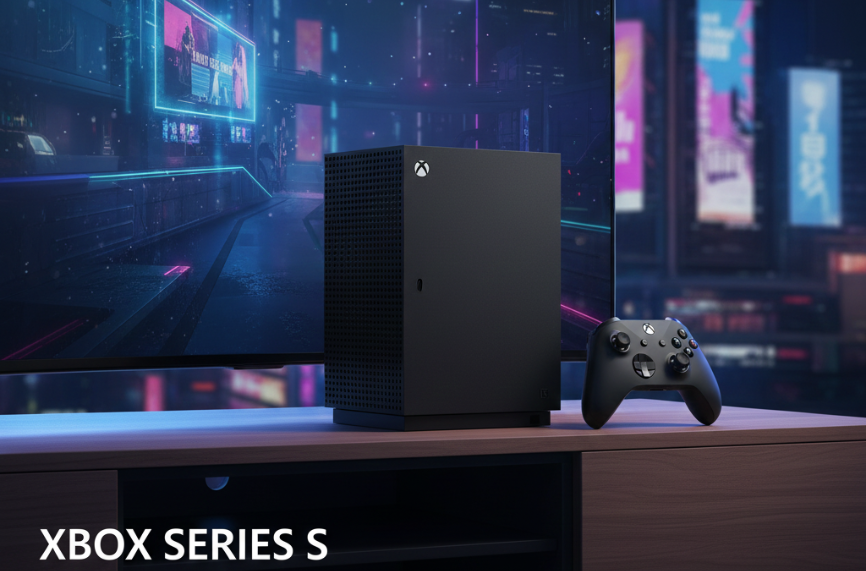
The Xbox Series S 1TB is the same compact, all-digital Series S console with double the internal storage of the original 512GB model. It has a 1TB NVMe SSD with roughly 800GB available for games, targets up to 1440p at up to 120 fps, and has no disc drive, so it suits players who buy digitally or use Xbox Game Pass and are tired of deleting games to make room.
Microsoft released the 1TB version in 2023 in a Carbon Black finish. Apart from storage and color, the hardware is the same as the original Series S. This guide covers what the extra space really means, how the console performs, load times and optimization features, expansion options, and who gets the most value from it.
Xbox Series S 1TB at a Glance
| Category | Key details | What it means for you |
|---|---|---|
| Storage | 1TB NVMe SSD, roughly 800GB usable | Room for many more large games than the 512GB model |
| Resolution target | Up to 1440p, with upscaling to 4K TVs | Sharp image on 1080p and 1440p screens; softer than Series X on 4K |
| Frame rate | Up to 120 fps in supported games | Smooth play in competitive and optimized titles |
| Processor | Custom AMD Zen 2 CPU, AMD RDNA 2 GPU | Same generation of architecture as Series X, with a less powerful GPU |
| Disc drive | None | Digital purchases and Game Pass only |
| Quick Resume | Suspends several games at once | Jump between titles in seconds |
| Backward compatibility | Xbox One and selected Xbox 360 and original Xbox games | Large back catalog without extra hardware |
| Expansion | Storage Expansion Card slot plus USB 3.1 drives | Grow storage later if needed |
| Finish | Carbon Black | Distinct from the white 512GB model |
A Closer Look at the Xbox Series S 1TB
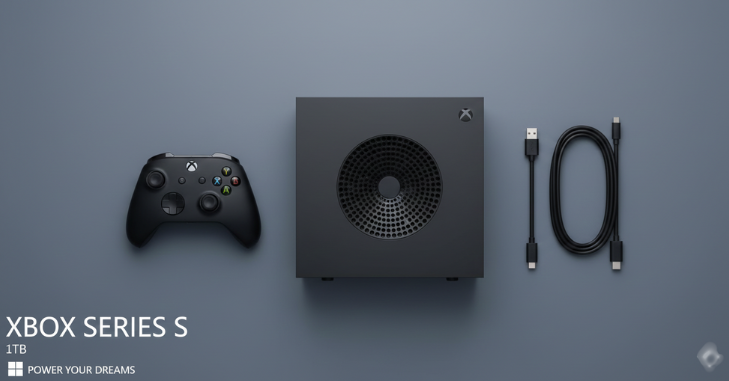
The Series S was designed as the smaller, lower-cost entry point to the current Xbox generation. It plays the same new games as the Series X and uses the same Xbox Velocity Architecture for fast storage, but renders at lower resolutions and has less GPU power and memory. The 1TB model keeps all of that and fixes the single most common complaint about the original: storage that filled up after only a handful of modern games.
Specifications
| Feature | Details |
|---|---|
| Storage | 1TB custom NVMe SSD |
| Performance target | Up to 1440p, up to 120 fps |
| CPU | 8-core custom AMD Zen 2 |
| Graphics | Custom AMD RDNA 2 |
| Optical drive | None (digital only) |
| Compatibility | Xbox Series X|S, Xbox One and selected Xbox 360 and original Xbox titles |
| Game Pass | Supported |
Storage Capacity: How Much Space Do You Actually Get?
A console never shows the full advertised capacity, because the operating system and reserved system files take a share. On the 1TB Series S, the usable figure is commonly reported at about 800GB, compared with roughly 360 to 365GB on the 512GB model. In practice that is more than double the room for games.
Game sizes and what fits
Modern game sizes vary a lot, and they change with every update and DLC pack. Series S versions are sometimes a little smaller because they skip 4K texture packs. As a rough guide, recent releases fall into these bands:
| Type of game | Typical size range | Approx. how many fit in ~800GB |
|---|---|---|
| Large live-service shooters (e.g. Call of Duty) | Can exceed 100GB with all modes installed | Several, alongside other games |
| Big open-world and AAA titles (e.g. Forza Horizon 5, Halo Infinite) | Often 50GB to 100GB+ | Roughly 8 to 15 |
| Mid-size games (e.g. Gears 5, Assassin’s Creed Valhalla) | Often 40GB to 80GB | Roughly 10 to 20 |
| Indie and smaller titles | Often under 10GB | Dozens |
Check the size listed on the Microsoft Store before downloading, as these numbers move over time. Many big games also let you uninstall single-player campaigns or multiplayer modes you do not use, which can free a lot of space.
Storage expansion options

- Storage Expansion Card: plugs into the rear slot and performs like the internal SSD, so Series X|S optimized games can run straight from it. It is the most convenient option but also the most expensive per gigabyte.
- USB 3.1 external drive: a cheaper way to store games. Xbox One, Xbox 360 and original Xbox titles can be played directly from it. Series X|S optimized games can be stored there but must be moved to internal storage or an expansion card to play.
- Smart library management: keep the games you play weekly on the SSD and park the rest on a USB drive, where moving them back is far faster than re-downloading.
Performance: What the Series S 1TB Can Do
Processing power
The Series S uses a custom AMD Zen 2 CPU, a large step up from the Xbox One family, which helps with physics, AI and faster world streaming. Its RDNA 2 graphics support modern features such as hardware-accelerated ray tracing, although ray tracing is used sparingly on Series S because the GPU is less powerful.
Frame rates and resolution
Where the Series X aims at native 4K, the Series S targets up to 1440p, and many demanding games run nearer 1080p or use dynamic resolution. On a 1080p or 1440p monitor the difference is modest; on a large 4K TV the Series X image is noticeably sharper. Frame rates of 60 fps are common, and some titles offer 120 fps modes on compatible displays.
Quick Resume
Quick Resume suspends several games so you can switch between them and return to where you left off in seconds. The feature works the same on the 512GB and 1TB models; the extra storage simply means more installed games to switch between.
Game Optimization Features

Smart Delivery
With Smart Delivery, supported games automatically install the best version for your console. If a title supports it and you own it on Xbox One, you get the Series X|S version at no extra cost. Not every game uses Smart Delivery, so check the store listing.
Optimized for Series X|S updates
Many developers patch games to use the newer hardware, adding higher frame rates, faster loading or improved visuals. Backward-compatible Xbox One games also benefit from the faster CPU and SSD even without patches, often loading quicker and running more consistently.
Dynamic resolution scaling and Auto HDR
Demanding games often adjust resolution on the fly to protect frame rate during busy scenes. Auto HDR can add high dynamic range to many older games on HDR-capable TVs, which is a nice upgrade for back-catalog titles.
Load Times

The NVMe SSD and Xbox Velocity Architecture cut load times sharply compared with the mechanical hard drives in the Xbox One generation. Many games boot and load levels in seconds rather than the long waits older consoles were known for. Exact times depend on the game, whether it has been optimized for Series X|S and where it is installed, so be cautious with precise per-game figures you see quoted online.
Installation location matters: games on the internal SSD or an expansion card load fastest, while older titles played from a USB hard drive load more slowly than they would internally.
Series S 1TB vs Series S 512GB vs Series X
| Series S 512GB | Series S 1TB | Series X | |
|---|---|---|---|
| Usable storage | About 360GB | About 800GB | About 800GB on the standard 1TB model |
| Resolution target | Up to 1440p | Up to 1440p | Up to 4K |
| Disc drive | No | No | Yes on standard models |
| Best for | Light players, small libraries | Digital-first and Game Pass players | 4K TVs and physical discs |
Prices change regularly and differ by retailer and region, so compare current prices before buying. The key question is whether the extra internal storage is cheaper than buying the 512GB model plus an expansion card, which it usually is.
Next-Gen Gaming Value

Who should buy the Series S 1TB
- Game Pass subscribers who like to keep many games installed
- Players with a 1080p or 1440p screen
- Families who want a second console for a bedroom or dorm
- Anyone who buys games digitally and wants to avoid constant uninstalls
Who should look elsewhere
- Players who own a large disc collection
- Anyone wanting the sharpest image on a big 4K TV
- People who only play one or two games and will not use the extra space
Xbox Game Pass integration
Game Pass gives access to a rotating catalog of games for a monthly fee, with tiers that differ in what they include. Because Game Pass encourages trying many games, it is exactly where the 512GB model ran out of space, and where the 1TB version makes the biggest difference.
Common mistakes to avoid
- Assuming you can play Series X|S optimized games from a USB hard drive.
- Expecting native 4K on a large TV.
- Forgetting that digital-only means no trade-ins or resales of games.
- Installing every game mode by default instead of only the ones you play.
Bottom Line on the Series S 1TB
The Xbox Series S 1TB is the version of the Series S most people should choose. It keeps the small size, quiet running and next-gen features of the original, and its roughly 800GB of usable space removes the storage pinch that made the 512GB model frustrating. If you play digitally on a 1080p or 1440p screen, especially with Game Pass, it offers strong value; if you want 4K or a disc drive, look at the Series X.
For more reading, browse our Gaming category. Our site also covers a wide range of other topics, from OPS in baseball for sports fans to Trello Universe for AUT, the 5150 hold explained, and even fried chicken wing calories for your next game-night snack.
FAQs
How much usable storage does the Xbox Series S 1TB have?
It is commonly reported to offer about 800GB of usable space. The rest is reserved for the operating system and system files.
Is the Series S 1TB more powerful than the 512GB model?
No. The processor, graphics and features are the same. The differences are the larger SSD and the Carbon Black color.
Can the Xbox Series S 1TB play discs?
No. Like the original Series S, it has no disc drive, so games must be bought digitally or played through Game Pass.
Can I expand storage on the Series S 1TB?
Yes. You can add a Storage Expansion Card that performs like the internal SSD, or use a USB 3.1 drive to store games and play older Xbox One, Xbox 360 and original Xbox titles.
How does the Series S compare to the Series X?
The Series S targets up to 1440p while the Series X targets 4K and has more GPU power. Both share fast SSD storage, Quick Resume and the same game library.
Is the Xbox Series S 1TB worth it?
For digital-only players and Game Pass users with a 1080p or 1440p screen, it is usually the better buy than the 512GB model. If you want 4K or physical discs, the Series X is the better fit.